¶ 端口镜像简介
端口镜像通过将指定端口或CPU的报文复制到与数据监测设备相连的端口,使用户可以利用数据监测设备分析这些复制过来的报文,以进行网络监控和故障排除。
¶ 基本概念
¶ 镜像源
镜像源是指被监控的对象,该对象可以是端口或单板上的CPU,我们将之依次称为源端口和源CPU。经由被监控的对象收发的报文会被复制一份到与数据监测设备相连的端口,用户就可以对这些报文(称为镜像报文)进行监控和分析了。
¶ 源设备
镜像源所在的设备就称为源设备。
¶ 镜像目的
镜像目的是指镜像报文所要到达的目的地,即与数据监测设备相连的端口,该端口称为目的端口。目的端口会将镜像报文转发给与之相连的数据监测设备。
由于一个目的端口可以同时监控多个镜像源,因此在某些组网环境下,目的端口可能收到对同一报文的多份拷贝。例如,目的端口Port A同时监控同一台设备上的源端口Port B和Port C收发的报文,如果某报文从Port B进入该设备后又从Port C发送出去,那么该报文将被复制两次给Port A。
¶ 目的设备
目的端口所在的设备称为目的设备。
¶ 镜像方向
镜像方向是指在镜像源上可复制哪些方向的报文:
- 入方向:是指仅复制镜像源收到的报文。
- 出方向:是指仅复制镜像源发出的报文。
- 双向:是指对镜像源收到和发出的报文都进行复制。
¶ 镜像组
镜像组是一个逻辑上的概念,镜像源和镜像目的都要属于某一个镜像组。根据具体的实现方式不同,镜像组可分为本地镜像组、远程源镜像组和远程目的镜像组。
¶ 反射端口、出端口和远程镜像VLAN
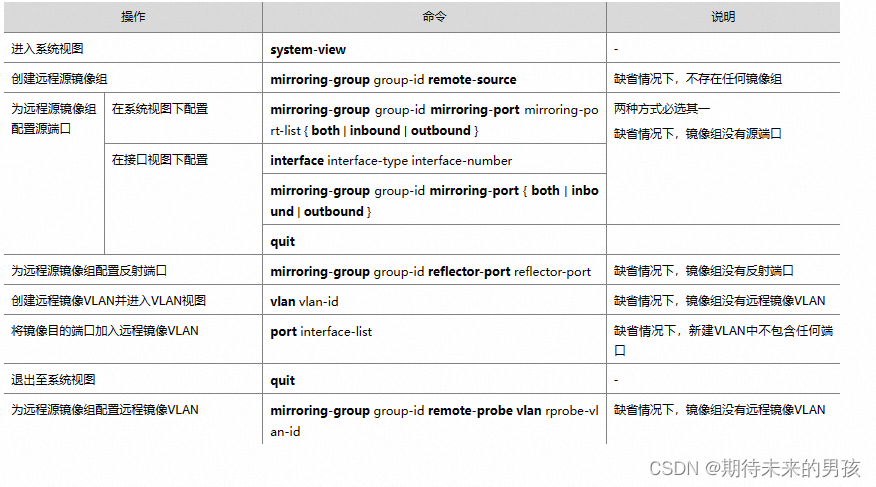
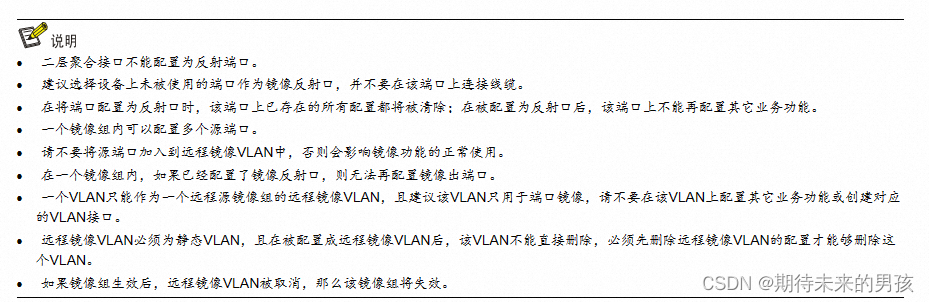
反射端口、出端口和远程镜像VLAN都是在二层远程端口镜像的实现过程中用到的概念。远程镜像VLAN是将镜像报文从源设备传送至目的设备的专用VLAN;反射端口和出端口都位于源设备上,都用来将镜像报文发送到远程镜像VLAN中。
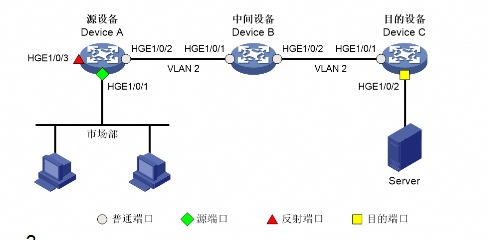
在配置端口镜像的设备上,除源端口、目的端口、反射端口、出端口外的其他端口统称为普通端口。
¶ 案例
(1)      配置Device C

# 配置端口HundredGigE1/0/1为Trunk口,并允许VLAN 2的报文通过。

<DeviceC> system-view

[DeviceC] interface hundredgige 1/0/1

[DeviceC-HundredGigE1/0/1] port link-type trunk

[DeviceC-HundredGigE1/0/1] port trunk permit vlan 2

[DeviceC-HundredGigE1/0/1] quit

# 创建远程目的镜像组2。

[DeviceC] mirroring-group 2 remote-destination

# 创建VLAN 2作为远程镜像VLAN。

[DeviceC] vlan 2

# 关闭VLAN 2的MAC地址学习功能。

[DeviceC-vlan2] undo mac-address mac-learning enable

[DeviceC-vlan2] quit

# 配置远程目的镜像组2的远程镜像VLAN为VLAN 2,目的端口为HundredGigE1/0/2,在该端口上关闭生成树协议并将其加入VLAN 2。

[DeviceC] mirroring-group 2 remote-probe vlan 2

[DeviceC] interface hundredgige 1/0/2

[DeviceC-HundredGigE1/0/2] mirroring-group 2 monitor-port

[DeviceC-HundredGigE1/0/2] undo stp enable

[DeviceC-HundredGigE1/0/2] port access vlan 2

[DeviceC-HundredGigE1/0/2] quit

(2)      配置Device B

# 创建VLAN 2作为远程镜像VLAN。

<DeviceB> system-view

[DeviceB] vlan 2

# 关闭VLAN 2的MAC地址学习功能。

[DeviceB-vlan2] undo mac-address mac-learning enable

[DeviceB-vlan2] quit

# 配置端口HundredGigE1/0/1为Trunk口,并允许VLAN 2的报文通过。

[DeviceB] interface hundredgige 1/0/1

[DeviceB-HundredGigE1/0/1] port link-type trunk

[DeviceB-HundredGigE1/0/1] port trunk permit vlan 2

[DeviceB-HundredGigE1/0/1] quit

# 配置端口HundredGigE1/0/2为Trunk口,并允许VLAN 2的报文通过。

[DeviceB] interface hundredgige 1/0/2

[DeviceB-HundredGigE1/0/2] port link-type trunk

[DeviceB-HundredGigE1/0/2] port trunk permit vlan 2

[DeviceB-HundredGigE1/0/2] quit

(3)      配置Device A

# 创建远程源镜像组1。

<DeviceA> system-view

[DeviceA] mirroring-group 1 remote-source

# 创建VLAN 2作为远程镜像VLAN。

[DeviceA] vlan 2

# 关闭VLAN 2的MAC地址学习功能。

[DeviceA-vlan2] undo mac-address mac-learning enable

[DeviceA-vlan2] quit

# 配置远程源镜像组1的远程镜像VLAN为VLAN 2,源端口为HundredGigE1/0/1,反射端口为HundredGigE1/0/3。

[DeviceA] mirroring-group 1 remote-probe vlan 2

[DeviceA] mirroring-group 1 mirroring-port hundredgige 1/0/1 both

[DeviceA] mirroring-group 1 reflector-port hundredgige 1/0/3

This operation may delete all settings made on the interface. Continue? [Y/N]: y

# 配置端口HundredGigE1/0/2为Trunk口,并允许VLAN 2的报文通过。

[DeviceA] interface hundredgige 1/0/2

[DeviceA-HundredGigE1/0/2] port link-type trunk

[DeviceA-HundredGigE1/0/2] port trunk permit vlan 2

[DeviceA-HundredGigE1/0/2] quit

4. 验证配置
# 显示Device C上所有镜像组的配置信息。

[DeviceC] display mirroring-group all

Mirroring group 2:

    Type: Remote destination

    Status: Active

    Monitor port: HundredGigE1/0/2

    Remote probe VLAN: 2

# 显示Device A上所有镜像组的配置信息。

[DeviceA] display mirroring-group all

Mirroring group 1:

    Type: Remote source

    Status: Active

    Mirroring port:

        HundredGigE1/0/1  Both

    Reflector port: HundredGigE1/0/3

    Remote probe VLAN: 2

配置完成后,用户可以通过Server监控所有进、出市场部的报文。